
Tutorial · 5
Test mode and switches
The switches inside the cabinet: the test button, the doors and the keys an engineer uses.
The switches
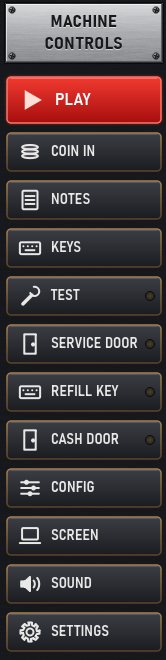
| Button | On the machine | Key |
|---|---|---|
| TEST | Hold the test button | Shift+T |
| SERVICE DOOR | Open or close the service door | Shift+S |
| REFILL KEY | Turn the refill key | Shift+R |
| CASH DOOR | Open or close the cash door | Shift+C |
| TOP UP | Hold the top-up switch | Shift+P |
| JP RESET | Hold the jackpot reset switch | |
| TEST 2 | Hold the second test switch | |
| DEMO | Hold the demo switch |
The lamp on a button lights while its door is open or its key is turned.
The machine's own test menus
The test and engineer menus are the machine's own program, shown on its own display, exactly as on the real machine. Open the service door or press TEST as the machine expects, then step through the menus with the layout's buttons, as an engineer would with the cabinet open. Each manufacturer's machines work their own way; the layout's notes (NOTES) often say how.
The stake, jackpot and percentage keys and Clear RAM are in CONFIG, MFME's Configuration for the game.
Games that need setting up on their first start
Like a new machine, some games need a set-up step the first time, or after a RAM clear:
- Scorpion 4 club games with an empty hopper: give them a refill with the REFILL KEY first.
- Some MPU6 games (Terminator, Reels of Gold, Star Wars, Alien) show DEVICE CHANGED until they have been set up once.
- Astra Pluto 6 games: at RAMCLEAR REQ, hold the player's (and the top box's) PUSH BUTTON for about ten seconds, then START at the date.
- Fairgames Pluto 5 games showing RAM CLEAR ERROR: use their RAM-clear key or switch, as the game's notes say.
- Empire Haunted House and Apache Gold show ALARM 04 until one reset; Ace System 1 games want one restart.
The first start of some systems (Adder 5, Scorpion 5, MPU5 ...) can take up to about two minutes while the machine runs its own power-on checks and pairs its coin, note and hopper units, shown at high speed. Coins put in before it is ready are not taken.